Docker

Hello readers, after longtime but getting you with more engineering content. With easy to understand and read. Like always let’s start with questions. What problem it is solving?
What Problems Does Docker Solve?
Before docker developers used to face the issue it works on my machine. Where applications would run fine on a developers local setup but fail in testing or production due to difference in operation systems, dependencies, libraries or configurations. But docker solved this by packaging applications and their dependencies into portable containers that run consistently across any environment like developer’s local setup or cloud server. It resolves the issues like dependency versions conflicts because multiple apps use multiple apps.
Docker Architecture:
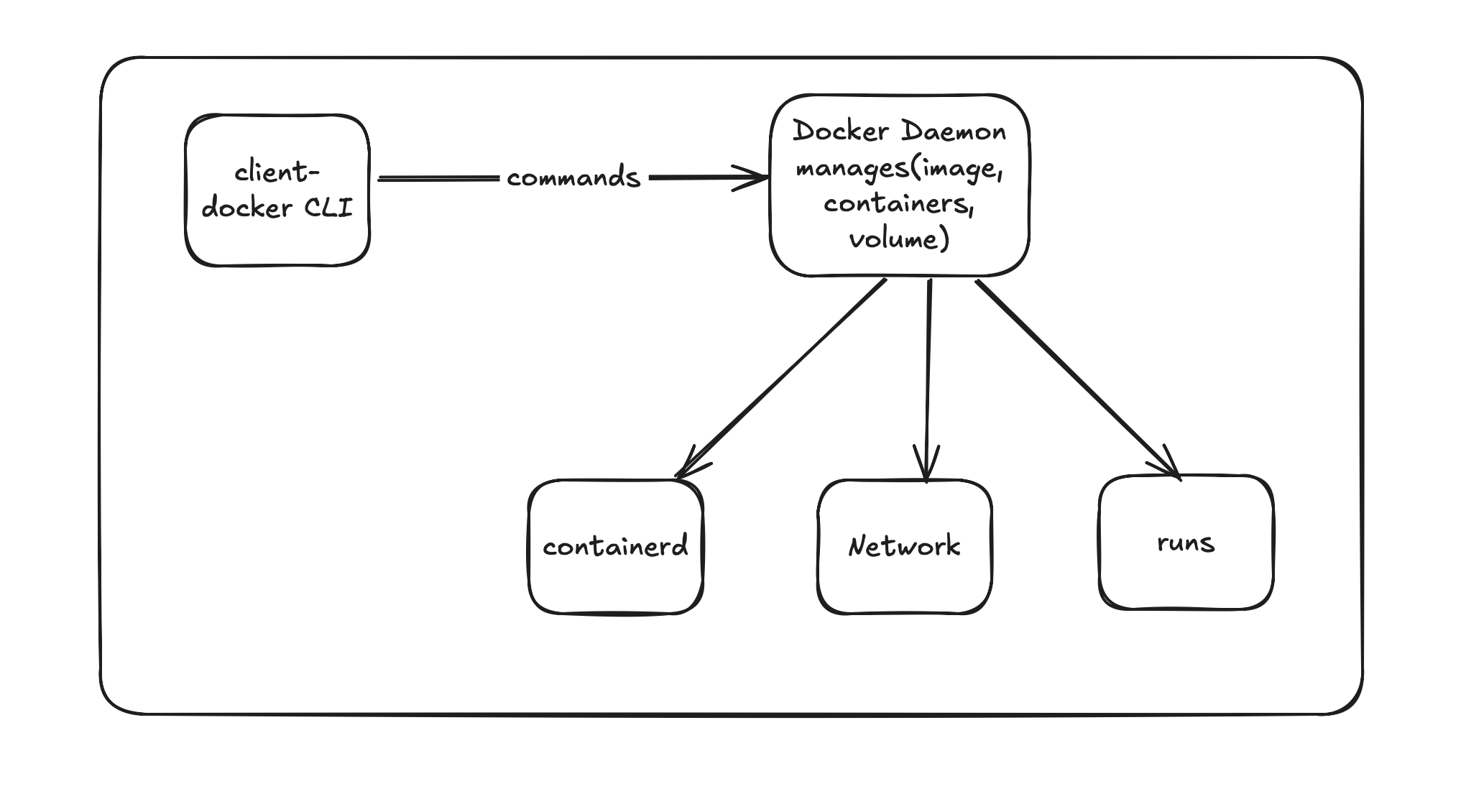
Docker uses a client-server architecture and is build on several key components. Below is the architecture HLD
Docker CLI
When you run docker run, build, pull, etc through docker client. It sends your commands via REST API to the Docker daemon. You can even have the client on one machine and control a remote daemon. It very useful in production.
Docker Daemon
This is the main component in docker architecture. Which listens for Docker API requests. Manages images, containers, networks, and volumes. Talks to container runtime to actually start or stop containers. It runs as a background service on the host OS.
Containerd
It is a high-level runtime that manages the complete container lifecycle. which pull image, run and supervise.
Docker manages four fundamental objects that form the core of Docker.
1.Images
2.Containers
3.Volumes
4.Networks
Images:
A Docker image contains your application code, runtime, libraries, dependencies, and configuration basically everything needed to run your app. You can create your own images using docker build, or download existing ones using docker pull from a registry like Docker Hub.
There are many container registries available, for example: Docker Hub, AWS ECR (Elastic Container Registry), Azure Container Registry (ACR), GCP Container Registry
Let’s see one in action:
Docker command: docker pull nginx:1.27
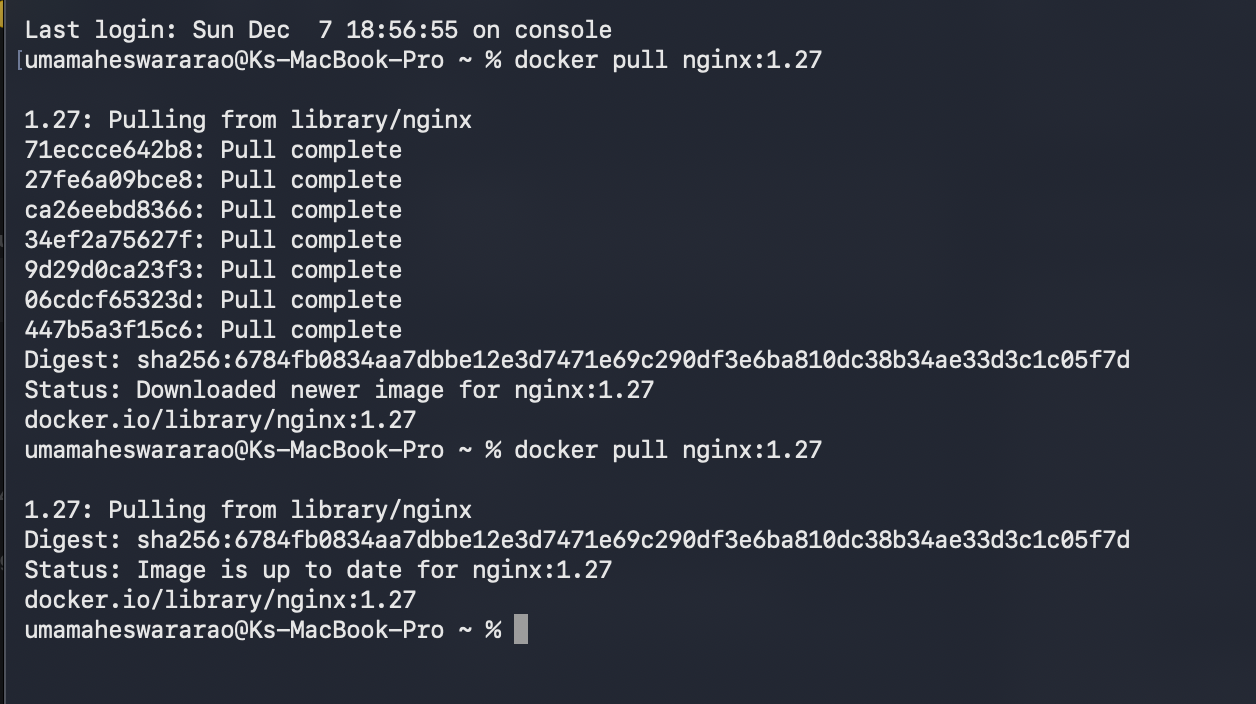
In my local, I don’t have the nginx image. so it downloaded it from the registry. If I hit for second time I am using the image from local cache. just updates will be pulled from the registry.
Now let’s see what we have downloaded by docker images
you could able to see niginx and mongo are the available images in the local. This 1.2GB and 281MB files were completely frozen. None of these images are running yet. It’s just sitting on your disk waiting to be used.

Now create your own image in 10 seconds:
The below Dockerfile is used to create a Docker image, but it does not create the image. It only defines the instructions. You must run the docker build command to actually create the image. Devops team can take this image and run the container in production environment. Command: docker build -t my-node-app .
Below is the example dockerfile
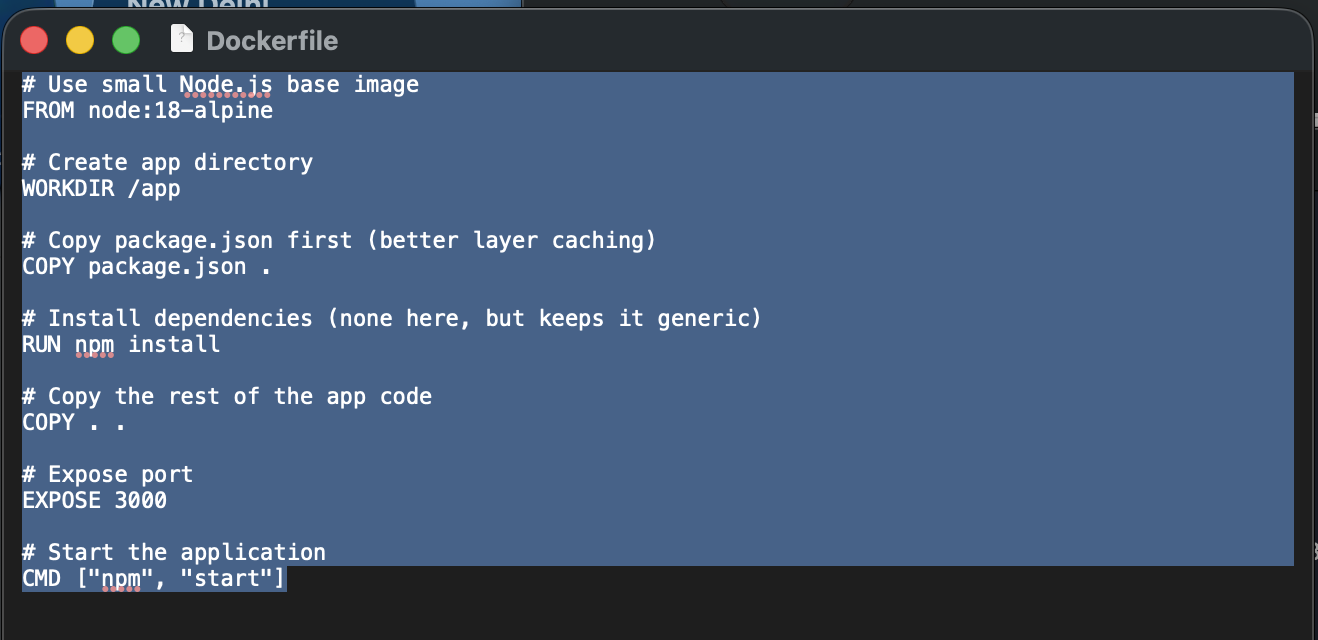
Now let me explain the above defined instructions in the docker file
FROM node:18-alpine
Uses official Node.js 18 Alpine image.
WORKDIR /app
It sets working directory inside container.
COPY package.json .
Copies only package.json first. It good practice for layer caching.
RUN npm install
Installs dependencies.
COPY . .
Copies the source code.
EXPOSE 3000 App runs on port 3000.
CMD ["npm", "start"] Runs npm start when container starts.
2. Containers:
Why Containers are required and what problem it is solving?
Containers solve the classic problem. “It works on my machine.” We will be avoiding this by packaging the application and its environment together, containers ensure consistent behavior across
1.Developer laptops
2.Test servers
3.Production clusters
4.Cloud Environment
A container is a lightweight, isolated process created from a Docker image. It includes everything needed to run your application: code, runtime, system libraries, and dependencies. They are all packaged together.
lets say If a docker image is a blueprint, then a container is the actual running application built from that blueprint. Similar to java class and objects. Containers are live, running instances of an image
Key Characteristics of Containers
Isolation
Each container runs in isolation from other containers and the host system. They have their own: File system Network stack Process space
Lightweight
Containers do not include a full operating system. They share the host OS kernel, making them: Faster to start Smaller in size more resource efficient. which make it more better compared to VMs
Ephemeral by Default
Containers are temporary. If you delete a container, any data inside it is lost unless stored in: Volumes
Lets understand difference between docker and VM's.
In a virtualization setup using VMware Workstation, the virtualization layer will be directly on top of the physical hardware or on top of a host operating system in the case of Type 2 hypervisors. This hypervisor is responsible for extracting the underlying hardware resources such as CPU, memory, storage and networking, and providing them as virtual hardware to multiple virtual machines. Each virtual machine installs and runs its own full operating system, complete with its own kernel, system libraries, and services. Applications are installed and executed inside these operating systems, making every virtual machine behave like a completely independent physical computer. This approach provides strong isolation, it also introduces additional overhead because every VM must boot and maintain an entire operating system stack
Containers are managed by Docker and it work in a simpler and lighter way. Instead of creating a full virtual computer like virtual machines, Docker just runs applications in separate, isolated spaces inside the same host operating system. All containers share the main system’s kernel, so they don’t need to install their own full operating system. So containers only carry the application and the files it needs to run.
Because of this containers are very small in size, start in just a few seconds, and use less memory and CPU. This makes them perfect for modern applications, especially when we need to run many services or quickly increase capacity like in cloud environments.
Let see how to run the containers from image.
For example: if we want to run a RabbitMQ broker locally. we first need to download the RabbitMQ image from Docker Hub and then start a container from that image. For that we need to use certain commands.
To download an image docker pull For RabbitMQ, the command would be docker pull rabbitmq.
run a container Once the image is downloaded, we can start a container using the docker run command.
Port forwarding: If the application inside the container needs to be accessed from our local machine, we must use port forwarding with the -p option. For example, docker run -p 3000:3000 rabbitmq maps ports between the host and the container. The first 3000 represents the port on your local machine, and the second 3000 represents the port inside the container. This allows traffic from your system to reach the application running inside the container.
To stop the container If you want to stop a running container, you can use the docker stop command.
Getting the docker images if already exists in local.

Run the docker image to create a container
Command: docker run -d --name rabbitmq_tls -p 5671:5671 -p 15672:15672 -p 15671:15671 rabbitmq:3.9.8-management

List of running conntainers

We have completed till container. In the next blogs I will cover Volumes and Networks.